¶ Spydus settings for picklist
As per the following document: loading_the_pick_list.docx
On a tablet, sign-in to Spydus and navigate to: Enquiry > Circulation > Item > Available for Allocation.
The following screenshot shows the default settings when creating a branch specific picklist - in this example, the branch is Tamworth Library:
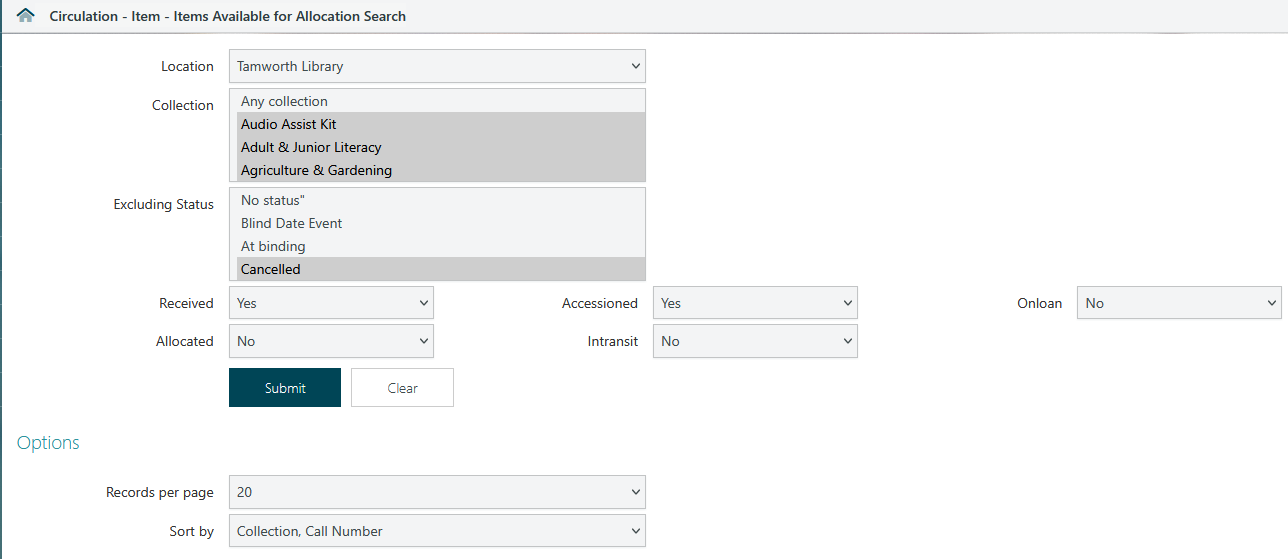
The settings that most frequently need changing when creating the picklist are:
- Location: Branch specific
- Intransit: No
- Onloan: No
- Sort by: Collection, Call Number - user preference but groups them together
Most of the tablets are already setup with the default selections for both Collections and Excluding Status but are provided below for reference.
¶ Collection
At the time of writing there are 127 options that may be selected. Of those 127 we usually select 105 of them as our default settings for the picklist.
It's easier, however, to refer to the ones that are not selected by default:
- Baby Book Pack
- Baby Book Time
- Music Cassette
- Closed Reserve
- Discards
- Electronic Resource
- Express
- HLS Talking CD
- Junior Music Cassette
- Knitting Needles
- Maps - Local History
- Magazine
- Nintendo
- Reference
- Reference CD-ROM
- Reference (REF)
- Reading Group
- Reading Group Kit
- Special Collection
- Seeds
- Tamworth Inter Library Loan
For reference, the 105 options that are selected:
- Audio Assist Kit
- Adult & Junior Literacy
- Agriculture & Gardening
- Agriculture & Gardening Junior
- Adult Non Fiction
- Art & Photography
- Art & Photography Junior
- Aboriginal Studies
- Autism Spectrum Disorder
- Autism Spectrum Disorder Junior
- Adult Tape & Text (Kit)
- Bike Chains
- Biograph
- Biograph Junior
- CakeTins
- CD
- CD-ROM
- Craft & Cooking
- Craft & Cooking Junior
- Downloadable Audiobooks
- Downloadable Ebook
- Default
- DVD
- Dyslexia Junior
- Picture Book
- Electronic Device
- eMagazines
- Engraving Tool
- Adult Fiction
- Australian Fiction
- Horror Fiction
- Foreign Language
- Mystery Fiction
- Romance Fiction
- Science Fiction
- Thriller Fiction
- Western Fiction
- Genealogy
- Board Games
- Graphic Novels
- Genealogy Pamphlet File
- Health & Sport
- Health & Sport Junior
- History
- History Junior
- Inter-library loan
- Indigenous
- Indigenous Junior
- Junior Non Fiction
- Junior CD
- Junior CD-ROM
- Junior DVD
- Junior Easy Reader
- Junior Fiction
- Junior Foreign Language
- Junior Fiction Picture Book
- Junior Large Print
- Junior Subtitled Video (Supertext)
- Junior Talking Book
- Junior Talking CD
- Junior Tape & Text (Kit)
- Junior Video
- Law, Economics & Business
- Law, Economics & Business Junior
- Local Government
- Local History
- Newspapers - Local History
- Local History Pamphlet File
- LIAC
- Literature
- Literature Junior
- Large Print
- Library Science
- Local Studies
- Local Studies Junior
- Music
- Music Junior
- Newspapers
- Paperback
- Pamphlet File
- Philosophy & Religion
- Philosophy & Religion Junior
- Remedial
- Reference Junior
- Skateboard
- Speech Language Pathology
- Save Power Kits
- Stack
- STEM Kits
- Subtitled Video (Supertext)
- Tactile Book
- Talking Book
- Talking CD
- Science & Technology
- Science & Technology Junior
- Talking MP3
- Travel
- Travel Junior
- Unknown in S8 conversion
- Video
- Young Adult Non Fiction
- Young Adult Fiction
- Young Adult Talking Book
- Young Adult Tape & Text (Kit)
- Young Adult Talking CD
¶ Excluding Status
At the time of writing there are 36 options that may be selected. Of those 36 we usually select the following 18 statuses selected to be excluded from the picklist:
- Being repaired
- Cancelled
- Cancelled (pre-conversion)
- Catalogue maintenance required
- Damaged
- Discarded
- In Cataloguing
- Inter-branch lending
- Lost and paid for
- Missing at stocktake
- Missing item
- Multicultural Bulk Loan
- Not for loan
- Physical Processing
- Reading Group
- Reservation Expired
- Routing
- WriteOff
For reference this leaves the following 18 statuses unselected and therefore included in the picklist:
- At binding
- Blind Date Event
- Data conversion - invalid collection code
- Hold for acquisitions
- Hold for display
- In-process
- Loan status
- MA15+ Rated items
- No status
- R18+ Rated Items
- Reservation available for collection
- Reservation Pending
- Return to ILL Officer
- Serials Maintenance
- Staff collection
- Stock Rotation
- Stocktake Pending
- Window Display